
Add a job from LinkedIn or Seek in one click
Paste a LinkedIn or Seek job link and StrongHire fills in the company, job title and description, then evaluate your resume and generate a cover letter.
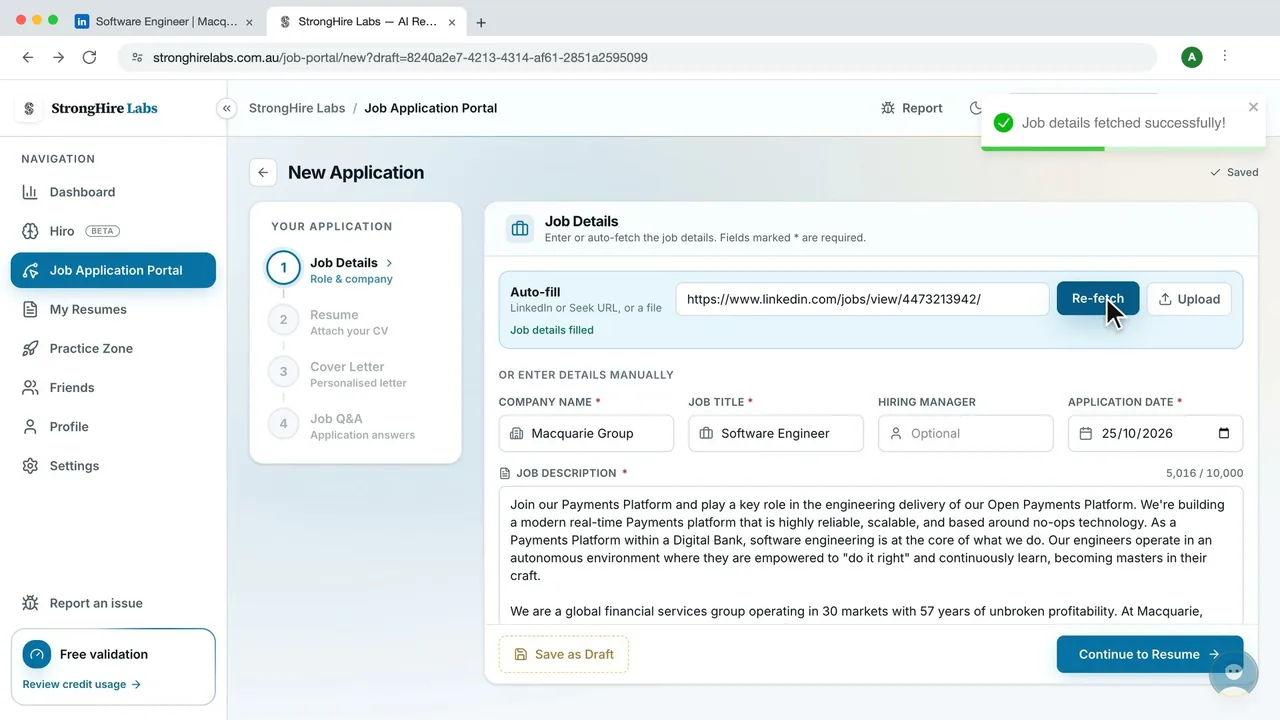
How it works
Copy the job link
Open the job on LinkedIn or Seek and copy its link from your browser's address bar.
Start a new application
In the Job Application Portal, click New Application.
Paste the link and click Fetch
Paste the link into the Auto-fill box and click Fetch. The company, job title and full job description are filled in for you. Check them, and add a note if you like.
Evaluate your resume
Pick the resume you want to send and click Evaluate for an overall score, plus a breakdown for ATS, tone, content, structure and skills. This step is optional.
Generate a cover letter
Generate a personalised cover letter, then edit it freely or download it as a PDF or DOCX. You can also continue without one.
Draft answers and save
Paste a question from the application form to get a ready-to-copy answer, then click Save Application to track it in your portal.
Frequently asked questions
- Which job links can I fetch?
- LinkedIn and Seek (Australia) job links. For other job boards, upload the job ad as a PDF, Word or text file, or paste the details into the form yourself.
- Does fetching job details use credits?
- No. Fetching from a link or reading an uploaded job ad is free. Evaluating a resume uses 3 credits, a cover letter uses 1 credit and each drafted answer uses 1 credit, from the 10 daily and 40 monthly credits shared across AI features.
- What if the fetch does not work?
- You will see a message asking you to fill in the details manually. Type or paste the company, job title and description, and the rest of the application works the same way.
- Can I finish an application later?
- Yes. A new application is saved as a draft while you work, and Save as Draft keeps it in your portal until you are ready to finish it.
Try it with your next job ad
Create a free account, open New Application and paste a job link. No payment card is needed during the validation launch.